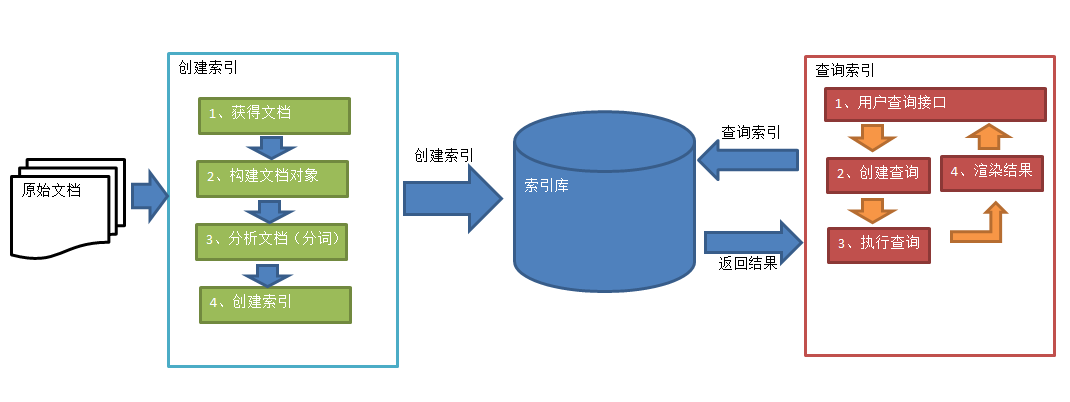
lucene基本使用

lucene基本使用

lucene主要用于对非结构化数据的解析,常见的非结构化数据例如:邮件、doc文档、pdf文档等等,lucene技术就是将这些非结构化数据解析整理成具有一定结构化的数据,lucene的基本使用主要分成下面几方面

  • 索引库的建立:将非结构化数据分析整理成具有一定结构化的数据,并创建索引库
  • 索引库的内容的增删改查

索引库的创建

创建索引的过程就是将原始文档的内容解析成多个域,例如解析一个word文档,将文档的名称传到文件名称域里面解析成多个关键词,将文档里面的内传到内容域里面解析成多个关键词,解析后的关键词都存储在域里面,然后将这几个域添加到一个文档对象里面,这就是原始文档到文档对象的解析过程。
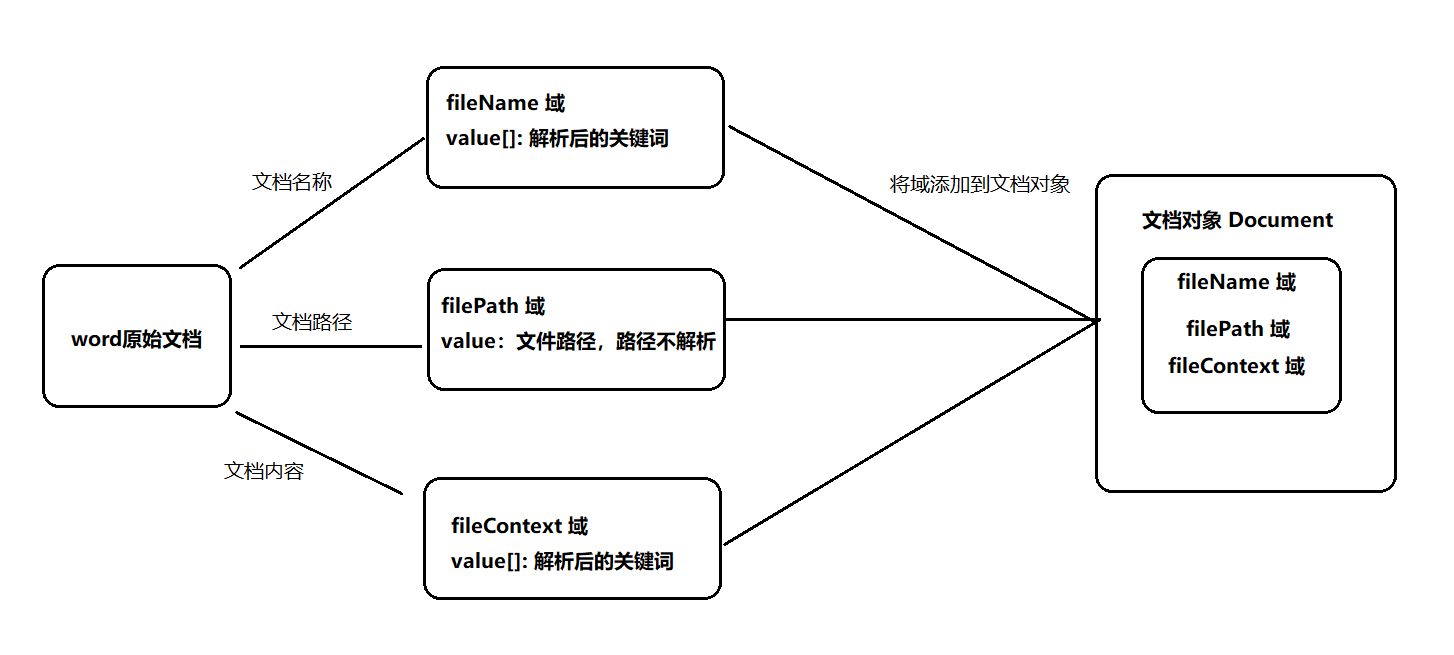
下面是创建索引库的实现步骤

1、引入依赖

1
2
3
4
5
6
7
8
9
10
11
12
13
14
15
16
17
18
19
20
 <dependency>
<groupId>junit</groupId>
<artifactId>junit</artifactId>
<version>4.13</version>
</dependency>
<dependency>
<groupId>org.apache.lucene</groupId>
<artifactId>lucene-core</artifactId>
<version>7.4.0</version>
</dependency>
<dependency>
<groupId>org.apache.lucene</groupId>
<artifactId>lucene-analyzers-common</artifactId>
<version>7.4.0</version>
</dependency>
<dependency>
<groupId>commons-io</groupId>
<artifactId>commons-io</artifactId>
<version>2.6</version>
</dependency>

2、代码实现

1
2
3
4
5
6
7
8
9
10
11
12
13
14
15
16
17
18
19
20
21
22
23
24
25
26
27
28
29
30
31
32
33
34
35
36
37
38
39
40
41
42
43
 @Test
public void createIndex() throws Exception{
//1、创建一个Director对象,指定索引库保存的位置,FSDirectory类将索引保存到磁盘中
Directory directory = FSDirectory.open(new File("要创建的索引库的路径").toPath());
//索引也可以储存在内存中,构建时使用RAMDirectory类,但是很少使用该方式
//Directory directory = new RAMDirectory();

//2、基于Directory对象创建一个IndexWriter对象
IndexWriterConfig config = new IndexWriterConfig();
IndexWriter indexWriter = new IndexWriter(directory,config);

//3、读取磁盘上的文件,获取每个文件的内容
File[] files = new File("要解析文件的目录的绝对路径").listFiles();
for (File file : files) {
//获取文档路径
String filePath = file.getPath();
//获取文档名称
String fileName = file.getName();
//获取文档大小
long fileSize = FileUtils.sizeOf(file);
//获取文档内容
String fileContext = FileUtils.readFileToString(file, "utf-8");

//4、把获取的文件内容解析到域中
Field filePathField = new StringField("filePath",filePath,Field.Store.YES);
Field fileNameField = new TextField("fileName",fileName,Field.Store.YES);
Field fileSizeField = new LongPoint("fileSize",fileSize);
Field fileContextField = new TextField("fileContext",fileContext,Field.Store.YES);

//5、创建文档对象,将域添加到文档对象中
// 此时文档对象就是由多个域构成,多个文档对象可能包含相同的域
Document document = new Document();
document.add(filePathField);
document.add(fileNameField);
document.add(fileSizeField);
document.add(fileContextField);

//6、把文档对象写入索引库
indexWriter.addDocument(document);
}
//7、关闭indexwriter对象
indexWriter.close();
}

3、Field域的属性

上述几个用到的几个域的属性详细说明如下

Field类 数据类型 Analyzed 是否分析 Indexed 是否索引 Stored 是否存储 说明
StringField(FieldName, FieldValue,Store.YES)) 字符串 N Y Y或N 这个Field用来构建一个字符串Field,但是不会进行分析,会将整个串存储在索引中,比如(订单号,姓名等) 是否存储在文档中用Store.YES或Store.NO决定
LongPoint(String name, long… point) Long型 Y Y N 可以使用LongPoint、IntPoint等类型存储数值类型的数据。让数值类型可以进行索引。但是不能存储数据,如果想存储数据还需要使用StoredField。
StoredField(FieldName, FieldValue) 重载方法,支持多种类型 N N Y 这个Field用来构建不同类型Field 不分析,不索引,但要Field存储在文档中
TextField(FieldName, FieldValue, Store.NO) 或 TextField(FieldName, reader) 字符串 或 流 Y Y Y或N 如果是一个Reader, lucene猜测内容比较多,会采用Unstored的策略.

查询索引库

1
2
3
4
5
6
7
8
9
10
11
12
13
14
15
16
17
18
19
20
21
22
23
24
25
26
27
28
29
30
@Test
public void searchIndex() throws Exception{
//1、创建一个Director对象,指定索引库的位置
Directory directory = FSDirectory.open(new File("索引库地址").toPath());
//2、创建一个IndexReader对象
IndexReader indexReader = DirectoryReader.open(directory);
//3、创建一个IndexSearcher对象,构造方法中的参数传入indexReader对象。
IndexSearcher indexSearcher = new IndexSearcher(indexReader);
//4、创建一个Query对象,Query是一个抽象类,所以使用它的子类TermQuery
//Term对象传入两个参数,第一个参数是要查询的域,第二个是查询的关键词
Query query = new TermQuery(new Term("fileContext","spring"));
//5、执行查询,得到一个TopDocs对象,search方法第二个参数指定一次最多查询几条数据
TopDocs topDocs = indexSearcher.search(query, 10);
//6、取查询结果的总记录数
long totalHits = topDocs.totalHits;
System.out.println("查询总条数:"+totalHits);
//7、取文档列表,TopDocs对象的scoreDocs方法返回查询后的所有文档的scoreDoc对象
for (ScoreDoc scoreDoc : topDocs.scoreDocs) {
//scoreDoc.doc存储了document对象的id,通过id获取到document对象
//8、打印文档中的内容
Document document = indexSearcher.doc(scoreDoc.doc);
System.out.println("文件名称:"+document.get("fileName"));
System.out.println("文件路径:"+document.get("filePath"));
System.out.println("文件大小:"+document.get("fileSize"));
System.out.println("文件内容:"+document.get("fileContext"));
System.out.println("-----------------------------");
}
//9、关闭IndexReader对象
indexReader.close();
}

删除索引

1、删除全部索引

1
2
3
4
5
6
7
8
9
10
11
@Before
public void init() throws Exception{
indexWriter = new IndexWriter(FSDirectory.open(new File("索引库路径").toPath()),new IndexWriterConfig(new IKAnalyzer()));
}

//删除索引库全部索引
@Test
public void deleteAllIndex() throws IOException {
indexWriter.deleteAll();
indexWriter.close();
}

2、删除指定索引

1
2
3
4
5
6
7
8
9
10
11
12
@Before
public void init() throws Exception{
indexWriter = new IndexWriter(FSDirectory.open(new File("索引库路径").toPath()),new IndexWriterConfig(new IKAnalyzer()));
}

@Test
public void deleteByQuery() throws Exception{
//删除文件名包含apache的文档的索引
long num = indexWriter.deleteDocuments(new Term("fileName", "apache"));
System.out.println(num);
indexWriter.close();
}

增加索引

新增一条索引的过程跟创建索引库的过程差不多,差别只在于增加索引只需要对一个原始文档进行解析

1
2
3
4
5
6
7
8
9
10
11
@Test
public void addDocument() throws Exception{
File file = new File("D:\\BaiduNetdiskDownload\\java\\12-lucene\\笔记.txt");
Document document = new Document();
document.add(new TextField("fileName",file.getName(), Field.Store.YES));
document.add(new StringField("filePath",file.getPath(), Field.Store.YES));
document.add(new LongPoint("fileSize", FileUtils.sizeOf(file)));
document.add(new TextField("fileName",file.getName(), Field.Store.YES));
indexWriter.addDocument(document);
indexWriter.close();
}

更新索引

更新索引的过程就是先删除该文档的原始索引,然后再创建一条该文档的新索引

打赏